

如何在NVIDIA GPU上进行性能压测,需要部署哪些工具?本文将介绍如何进行性能压测,以及需要部署哪些工具。
NVIDIA【性能压测】#
基础环境:
- Ubuntu 22.04;内核5.15.0-119-generic
- NVIDIA GPU
- Mellanox
- GitHub【科学网络】
一、基础环境#
1.1 配置源#
- 备份原有 sources.list(若已存在则不重复覆盖)
[ -f /etc/apt/sources.list ] && cp -n /etc/apt/sources.list /etc/apt/sources.list.bak
- 写入阿里云 Ubuntu 22.04 (jammy) 镜像源
cat <<'EOF' > /etc/apt/sources.list
deb https://mirrors.aliyun.com/ubuntu/ jammy main restricted universe multiverse
deb-src https://mirrors.aliyun.com/ubuntu/ jammy main restricted universe multiverse

deb https://mirrors.aliyun.com/ubuntu/ jammy-security main restricted universe multiverse
deb-src https://mirrors.aliyun.com/ubuntu/ jammy-security main restricted universe multiverse

deb https://mirrors.aliyun.com/ubuntu/ jammy-updates main restricted universe multiverse
deb-src https://mirrors.aliyun.com/ubuntu/ jammy-updates main restricted universe multiverse

# deb https://mirrors.aliyun.com/ubuntu/ jammy-proposed main restricted universe multiverse
# deb-src https://mirrors.aliyun.com/ubuntu/ jammy-proposed main restricted universe multiverse

deb https://mirrors.aliyun.com/ubuntu/ jammy-backports main restricted universe multiverse
deb-src https://mirrors.aliyun.com/ubuntu/ jammy-backports main restricted universe multiverse
EOF
- 更新源
sudo apt update
1.2 内核包#
apt install linux-image-5.15.0-119-generic linux-headers-5.15.0-119-generic linux-tools-5.15.0-119-generic linux-cloud-tools-5.15.0-119-generic
二、gdrdrv#
安装方式#
本地编译
本地编译手动构建 rpm 、deb 包,进行安装。建议使用官方已经构建好的 rpm 、deb 包进行安装。
参考文档: GitHub gdrcopy
DNF OR APT
软件文档: gdrcopy
- 下载安装包;依次选择cuda版本、操作系统、CPU架构
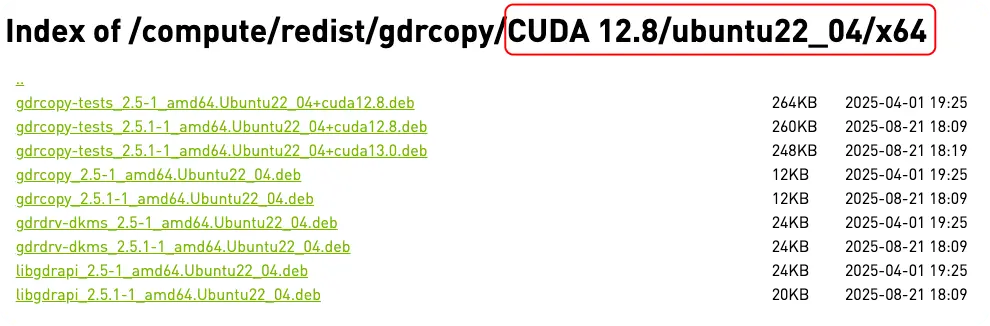
# 1. 下载deb
wget https://developer.download.nvidia.cn/compute/redist/gdrcopy/CUDA%2012.8/ubuntu22_04/x64/gdrdrv-dkms_2.5.1-1_amd64.Ubuntu22_04.deb
wget https://developer.download.nvidia.cn/compute/redist/gdrcopy/CUDA%2012.8/ubuntu22_04/x64/libgdrapi_2.5.1-1_amd64.Ubuntu22_04.deb
wget https://developer.download.nvidia.cn/compute/redist/gdrcopy/CUDA%2012.8/ubuntu22_04/x64/gdrcopy_2.5.1-1_amd64.Ubuntu22_04.deb
wget https://developer.download.nvidia.cn/compute/redist/gdrcopy/CUDA%2012.8/ubuntu22_04/x64/gdrcopy-tests_2.5.1-1_amd64.Ubuntu22_04+cuda12.8.deb

# 2. 安装
# apt 方式
apt install ./*.deb
# dpkg 方式
dpkg -i ./*.deb
结语#
参考: