

NVIDIA HPC-X 是 NVIDIA 推出的一个用于加速 MPI 应用的开源软件包,提高消息传递通信的可扩展性和性能。
NVIDIA【HPC-X】#
基础环境:
- Ubuntu 22.04;内核5.15.0-119-generic
- NVIDIA GPU
- Mellanox
一、基础环境#
1.1 配置源#
- 备份原有 sources.list(若已存在则不重复覆盖)
[ -f /etc/apt/sources.list ] && cp -n /etc/apt/sources.list /etc/apt/sources.list.bak
- 写入阿里云 Ubuntu 22.04 (jammy) 镜像源
cat <<'EOF' > /etc/apt/sources.list
deb https://mirrors.aliyun.com/ubuntu/ jammy main restricted universe multiverse
deb-src https://mirrors.aliyun.com/ubuntu/ jammy main restricted universe multiverse

deb https://mirrors.aliyun.com/ubuntu/ jammy-security main restricted universe multiverse
deb-src https://mirrors.aliyun.com/ubuntu/ jammy-security main restricted universe multiverse

deb https://mirrors.aliyun.com/ubuntu/ jammy-updates main restricted universe multiverse
deb-src https://mirrors.aliyun.com/ubuntu/ jammy-updates main restricted universe multiverse

# deb https://mirrors.aliyun.com/ubuntu/ jammy-proposed main restricted universe multiverse
# deb-src https://mirrors.aliyun.com/ubuntu/ jammy-proposed main restricted universe multiverse

deb https://mirrors.aliyun.com/ubuntu/ jammy-backports main restricted universe multiverse
deb-src https://mirrors.aliyun.com/ubuntu/ jammy-backports main restricted universe multiverse
EOF
- 更新源
sudo apt update
二、HPC-X#
下载(根据需求下载指定系统、版本的驱动包)NVIDIA HPC-X: NVIDIA HPC-X
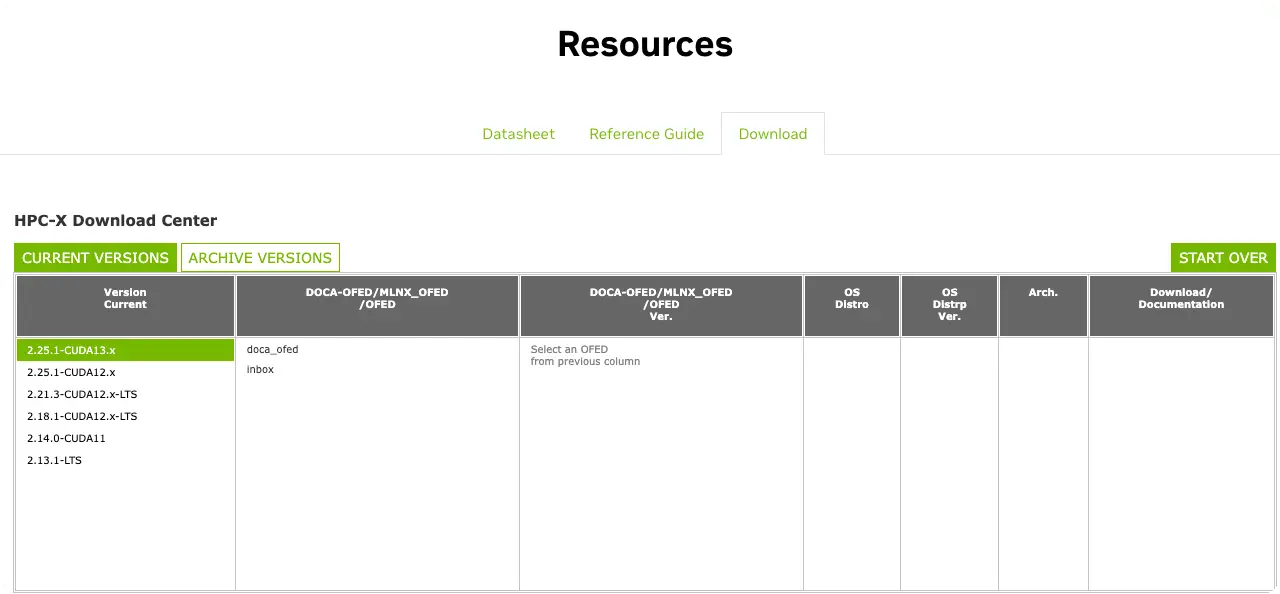
点击下载,选择版本信息
cuda12.x
- https://content.mellanox.com/hpc/hpc-x/v2.25.1_cuda12/hpcx-v2.25.1-gcc-doca_ofed-ubuntu22.04-cuda12-x86_64.tbz
- https://content.mellanox.com/hpc/hpc-x/v2.21.3/hpcx-v2.21.3-gcc-doca_ofed-ubuntu22.04-cuda12-x86_64.tbz
- https://content.mellanox.com/hpc/hpc-x/v2.18.1/hpcx-v2.18.1-gcc-mlnx_ofed-ubuntu22.04-cuda12-x86_64.tbz
- 安装
请修改脚本中安装包信息,并运行脚本!
#!/bin/bash
set -e

# HPC-X version and package information
HPCX_VER="v2.18.1"
HPCX_FILE="hpcx-${HPCX_VER}-gcc-mlnx_ofed-ubuntu22.04-cuda12-x86_64.tbz"
HPCX_URL="https://content.mellanox.com/hpc/hpc-x/${HPCX_VER}/${HPCX_FILE}"

# Installation paths
INSTALL_DIR="/usr/local/src"
SRC_DIR="${INSTALL_DIR}/hpcx-${HPCX_VER}-gcc-mlnx_ofed-ubuntu22.04-cuda12-x86_64"
HPCX_DIR="${INSTALL_DIR}/hpcx"
PROFILE_FILE="/etc/profile.d/hpcx.sh"

# Check required commands
command -v wget >/dev/null || { echo "wget not found"; exit 1; }
command -v tar  >/dev/null || { echo "tar not found"; exit 1; }

# Download the package if it does not already exist
if [ ! -f "${HPCX_FILE}" ]; then
  wget -c "${HPCX_URL}"
fi

# Extract the package
tar -xvf "${HPCX_FILE}" -C "${INSTALL_DIR}"

# Rename the extracted directory to a unified path
if [ -d "${SRC_DIR}" ] && [ ! -d "${HPCX_DIR}" ]; then
  mv "${SRC_DIR}" "${HPCX_DIR}"
fi

# Create system-wide environment configuration
cat >"${PROFILE_FILE}" <<'EOF'
# NVIDIA HPC-X system-wide environment settings

export HPCX_HOME=/usr/local/src/hpcx

if [ -f "$HPCX_HOME/hpcx-init.sh" ]; then
  source "$HPCX_HOME/hpcx-init.sh"
  hpcx_load
fi
EOF

# Set proper permissions
chmod 644 "${PROFILE_FILE}"

# Source the environment immediately for the current session
if [ -f "${HPCX_DIR}/hpcx-init.sh" ]; then
  source "${HPCX_DIR}/hpcx-init.sh"
  hpcx_load
fi

echo "HPC-X ${HPCX_VER} installation completed successfully."
echo "Environment variables are now active in the current shell."
echo "For new sessions, they will be loaded automatically."
- 目录组织
root@ubuntu:/usr/local/src# tree -L 1 hpcx/
hpcx/
├── archive
├── clusterkit
├── hcoll
├── hpcx-debug-init-ompi.sh
├── hpcx-debug-init.sh -> hpcx-debug-init-ompi.sh
├── hpcx-init-ompi.sh
├── hpcx-init.sh -> hpcx-init-ompi.sh
├── hpcx-mt-init-ompi.sh
├── hpcx-mt-init.sh -> hpcx-mt-init-ompi.sh
├── hpcx-prof-init-ompi.sh
├── hpcx-prof-init.sh -> hpcx-prof-init-ompi.sh
├── hpcx-stack-init-ompi.sh
├── hpcx-stack-init.sh -> hpcx-stack-init-ompi.sh
├── modulefiles
├── nccl_rdma_sharp_plugin
├── ompi
├── OSS_Licenses.pdf
├── OSS_Notices.pdf
├── README.txt
├── sharp
├── sources
├── ucc
├── ucx
├── utils
└── VERSION

12 directories, 14 files
三、验证#
结语#
NVIDIA HPC-X 是一套综合性软件包,包含消息传递接口(MPI)、对称分层内存(SHMEM)和分区全局地址空间(PGAS)通信库,以及多种加速组件。该功能完备、经过测试并已打包的工具集,使 MPI 和 SHMEM/PGAS 编程模型能够实现高性能、高可扩展性和高效率,并确保通信库针对 NVIDIA Quantum InfiniBand 网络解决方案进行了充分优化。
参考: